


Calendar For Android
3.8567.00 Reviews
App Specs
- Version
- 2.7
- Updated On
- License
- Free
- Downloads
- 100,000+
- Developer
- GALLERY PRO
- Categories
- Productivity
- Platform
- Android
Screenshots
 Analysis by AppCompare
I usually want a calendar to answer a few basic questions quickly: what is happening today, what needs attention next, and have I set a reminder before I forget? Calendar for Android is aimed at that everyday job, with event planning and reminders at its center. It is a free productivity app from GALLERY PRO, and it may suit people who want a straightforward place to organize commitments rather than a complicated planning system.
Cost, setup, and the first impression
The app is free to download, though in-app purchases are available, with listed items ranging from $0.99 to $44.99 each. That makes it possible to try the calendar without paying upfront, but I would not treat the free entry price as proof that every useful option is included at no cost. I’d first use the features I actually need, then decide whether any purchase is worth considering rather than buying on the assumption that it unlocks a particular capability.
It is rated for Everyone, runs on Android 8.0 or later, and its current version is 2.7. The app was released on March 25, 2025. Its average rating is 3.8 from around 3,800 ratings, with 567 written reviews, and it has passed 100,000 installs. Those figures suggest a real user base, but they don’t tell me whether it will fit a particular routine; the useful test is whether its event entry and reminders feel comfortable in daily use.
Getting Started
First things first, downloading Calendar for Android is a breeze. You can find it on the Google Play Store, and it’s a quick install. Once you open the app, you'll notice a clean, intuitive interface. It’s like stepping into a neatly organized office—everything is where you expect it to be.
What to check before relying on it
A calendar becomes more useful when it reflects the way you already keep time. If you use another calendar service, check whether the events you depend on actually appear and stay current before making this your main schedule. The published description focuses on planning events and setting reminders; the older article’s claims about syncing with Google Calendar or Outlook, task lists, suggested meeting times, color coding, offline management, and crash-free performance should not be treated as confirmed capabilities. I’d verify those directly in the app rather than build a workflow around them.
That verification matters most for recurring commitments and shared plans. Add a low-stakes event first, check how it appears in the calendar, and set a reminder you can test. If you are moving from another app, keep the old calendar available until you are confident that the events you need are present. This small overlap is less convenient than switching instantly, but it avoids the far worse surprise of discovering a missing appointment on a busy day.
Features That Stand Out
One of the coolest features of this app is the seamless integration with other platforms. Whether you’re using Google Calendar or Outlook, syncing up is super straightforward. No more having to flip between apps or manually input events—it’s all there, all the time.
Worth Reading Before You Choose

EA SPORTS FC Mobile 26 Is a Bigger Football Game, but It Takes Time

Flipboard Shows What News Apps Must Do Beyond the Feed

Switching to Android Auto Means Rethinking Your Driving Routine

Google Calendar Makes a Crowded Week Easier to Manage

Ludo King Makes the Most of the Minutes Between Plans

Baby Panda World Brings Quick Play to Modern Phones, but Its Game Library Feels Busy
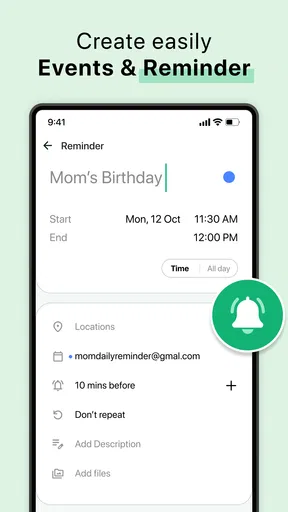
Another highlight is the customizable notifications. You can set reminders for any event, and the app lets you choose how you want to be notified. Whether it’s a gentle nudge or a loud reminder, it’s totally up to you.
A reminder workflow that stays useful
Even a simple reminder can fail if it is attached to the wrong event or set too close to the start time. For an appointment that involves travel, I’d create the event as soon as it is agreed, include the location or other essential context in its details if the app allows it, and choose a reminder early enough to leave time to act. For a call or a household task, a closer reminder may be enough. The useful habit is matching the alert to the preparation required, not giving every event the same notification.
I would also avoid using a calendar as a catch-all for every thought. Put fixed commitments and time-sensitive deadlines there; keep loose ideas somewhere designed for notes or lists if the calendar does not make them easy to review. That separation makes the day view more readable and helps prevent a flood of low-priority entries from hiding the appointments that matter.
Simplifying Your Day
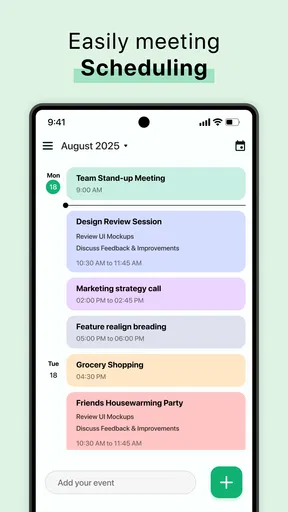
Ever tried planning an event and ended up with a headache? This app’s got that covered. The scheduling feature is incredibly user-friendly. You can create events with just a few taps, and the app even suggests optimal times based on your availability. It’s like having a super-smart friend who always knows when you’re free.
If you’re someone who loves lists, the task feature will be your best friend. You can jot down tasks, prioritize them, and even set deadlines. Watching tasks get crossed off your list is oddly satisfying, trust me!
What a realistic day looks like
Imagine I have a work appointment, a school pickup, and a repair visit to fit into one weekday. I would enter the fixed appointment first, then add the pickup and repair window, giving each a clear name so I can scan the day without opening every event. I’d set reminders according to what needs preparation, then look over the schedule the night before. That routine is useful even if the app does nothing more than keep the events and alerts together; it also makes any missing sync or reminder behavior visible while there is still time to correct it.
For plans that change, I would edit the existing event rather than create a second version and hope I remember which one is current. After changing a time, I’d check that the reminder still makes sense. This is a small but practical safeguard in any calendar: a time change can make an otherwise well-configured alert too early, too late, or irrelevant.
Design and Usability
The design is minimalistic yet functional. The developers have clearly focused on making the app as user-friendly as possible. It doesn’t overwhelm you with too many options or complicated processes. It’s all about efficiency here.
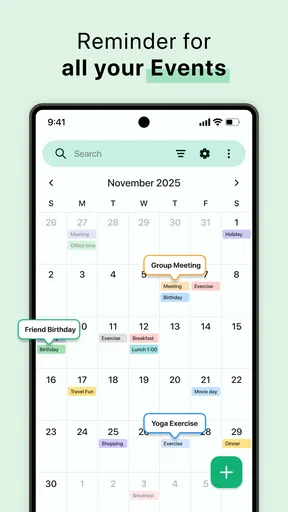
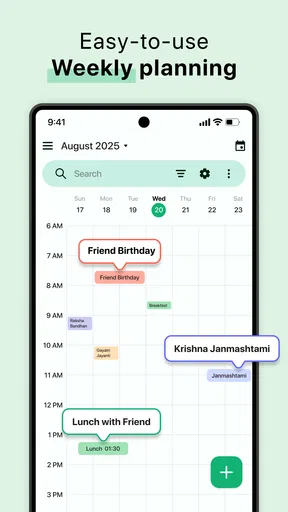
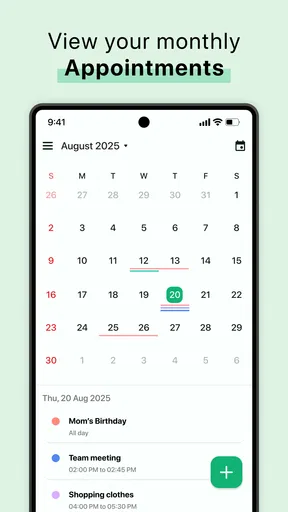
The monthly and weekly view options are a nice touch, allowing you to see your schedule at a glance. The color-coding feature is another bonus, helping you differentiate between personal and professional commitments easily.
Choosing it over familiar alternatives
Compared with a built-in phone calendar, a dedicated calendar app is worth keeping only if it makes event entry, reminders, or schedule review easier for you. A built-in option may be the better choice if it already syncs reliably with the account you use and you want fewer apps to maintain. Likewise, people who coordinate a team, depend on shared calendars, or need detailed project planning should test those workflows before switching; a basic personal calendar is not automatically a substitute for a collaboration or task-management tool.
The trade-off is simplicity versus certainty about advanced needs. This app’s free access makes it easy to evaluate, but the presence of paid items means I would inspect the purchase prompts and available options before deciding whether it is a long-term fit. I would not pay simply because I want a dependable calendar; first I’d confirm that the specific feature I need is included and that the app handles my routine well.
Who is likely to get value
I’d consider it for someone who wants a dedicated Android place for everyday appointments and reminders, is comfortable testing a new calendar, and does not need a highly specialized planning setup. It may also appeal to someone whose current schedule is scattered across notes and memory, provided the app’s actual event and notification behavior checks out during a short trial.
I’d skip it, or keep it as a secondary calendar, if missing an event would have serious consequences and I have not yet verified synchronization and alert behavior. The same goes for users who rely on complex shared schedules or need guaranteed compatibility with a particular service. In those cases, the calendar already used by family, colleagues, or an organization may be more valuable than a clean interface in a separate app.
Why You'll Love It
What really makes this app shine is its reliability. It doesn’t crash or slow down, even if you’ve loaded it with a ton of events. It’s dependable, which is exactly what you need in a calendar app. Plus, the offline access feature is a game-changer. You can view and manage your calendar without an internet connection, which is perfect for those times when Wi-Fi is spotty.
My buy-or-skip verdict
My recommendation is to try it without paying first, add a few ordinary events, and test the reminders under the conditions you normally use your phone. Check how the schedule behaves when plans change and whether it fits alongside your existing calendar. If it proves dependable for your own routine, the free starting point is appealing. If you need advanced sharing, confirmed service integrations, or a task system you can trust without testing, I’d stick with a better-established option for that workflow.
Final Thoughts
In a world where time management is key, having a tool like Calendar for Android can make all the difference. It’s simple, efficient, and packed with features that cater to both casual users and power users. If you’re looking to bring order to your chaotic schedule, this app is definitely worth a download. So go ahead, give it a try, and watch your productivity soar!
Pros
- Intuitive user interface design.
- Seamless syncing with other calendars.
- Customizable reminders and alerts.
- Supports multiple time zones.
- Offline access to events.
Cons
- Limited color coding options.
- Ads can be intrusive at times.
- Lacks advanced task management.
- Requires internet for cloud sync.
- No built-in weather integration.
FAQs for Calendar For Android
What features does the Calendar for Android app offer?
The Calendar for Android app provides a comprehensive suite of features, including event scheduling, reminders, task management, and integration with other apps like Google Calendar and Microsoft Outlook. It also supports multiple calendar views such as daily, weekly, and monthly, making it easy to organize your schedule efficiently.
Is the Calendar for Android app free to use?
The app offers a free version with basic features suitable for everyday use. However, there is also a premium version available that unlocks additional features like advanced customization, ad-free experience, and priority support. It's recommended to start with the free version to determine if it meets your needs before upgrading.
Does the Calendar for Android app require an internet connection?
While an internet connection is necessary for syncing events with online calendars and receiving real-time updates, the app can function offline to view and manage existing events. Any changes made offline will sync automatically once the device reconnects to the internet, ensuring seamless access to your schedule.
How does the Calendar for Android app handle data privacy?
The Calendar for Android app takes user privacy seriously. It uses encryption to protect data and requires minimal permissions to function. Users can manage their data sharing preferences within the app settings. The app complies with data protection regulations, ensuring that your personal information remains secure.
Can I customize notifications and reminders in the Calendar for Android app?
Yes, the app offers extensive customization options for notifications and reminders. You can set up multiple alerts for different events, choose specific notification tones, and even customize the timing of reminders. This flexibility ensures that you never miss an important appointment or deadline.


